Lenovo X230 (Maximized) (applies to all 4mb+8mb SPI chips maximized boards)
⚠️ Safety First
Before starting, please read our SPI Programmer Best Practices guide for essential safety information and programmer recommendations.
X230 Hardware Maintenance Manual
X230 Tablet Hardware Maintenance Manual
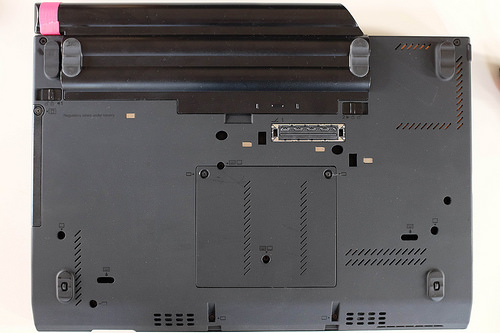
Critical: Remove the batteries AND disconnect the AC adapter before starting. The Thinkpad x230 has two SPI flash chips that hold the BIOS, ME, etc. and are located under the palm rest. To access these chips, first remove the indicated screws on the back of the laptop.
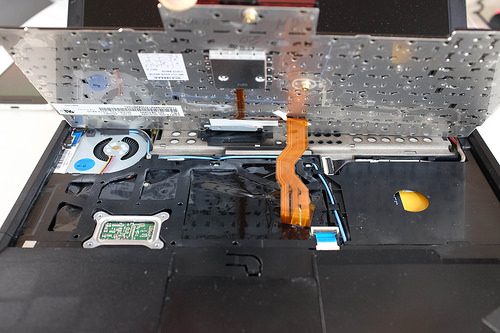
Removing these screws will allow you to remove the keyboard and palm rest.
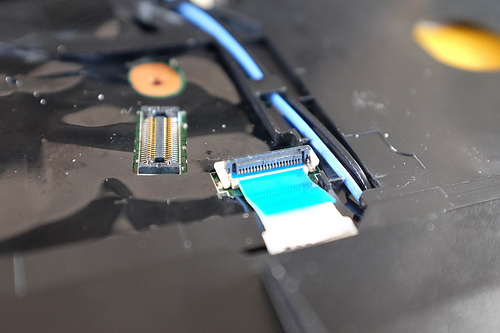
The keyboard is connected to the motherboard by a ribbon cable which easily detaches from the motherboard. (The keyboard only needs to be removed so that the palm rest can be removed. After removing the palm rest, you can put the keyboard back.)
The palm rest is also connected to the motherboard, but there is a little latch holding its ribbon cable. After undoing that latch, the palm rest should be fairly easy to remove.
Pull up the black plastic on the bottom right of the palm rest to reveal the two SPI flash chips.
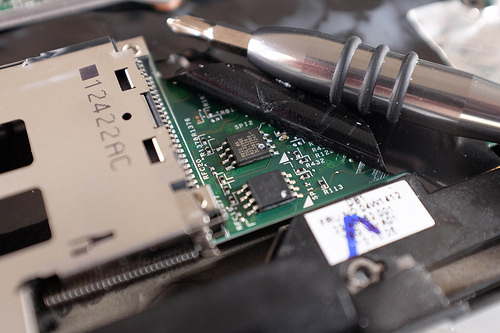
The top chip is 4MB and contains the BIOS and reset vector. The bottom chip is 8MB and has the Intel Management Engine (ME) firmware, plus the flash descriptor.
Based on the work done here, the chips should be one 4M and one 8M of the following:
| Vendor | Device | size |
|---|---|---|
| Eon | EN25QH32 | 4M |
| Eon | EN25QH64 | 8M |
| Macronix | MX25L3206E - MX25L3206E/MX25L3208E | 4M |
| Macronix | MX25L6405,MX25L6405D, MX25L6406E/MX25L6408E, MX25L6436E/MX25L6445E/MX25L6465E/MX25L6473E/MX25L6473F, MX25L6495F | 8M |
| Micron/Numonyx/ST | N25Q032..1E, N25Q032..3E | 4M |
| Micron/Numonyx/ST | N25Q064..1E, N25Q064..3E | 8M |
| Winbond | W25Q32.V, W25Q32.W | 4M |
| Winbond | W25Q64.V, W25Q32.W | 8M |
First download / build the maximized board roms (top and bottom) for this board and verify their hashes.
Initial BIOS step: Before attempting ME cleaning or SPI flashing, upgrade the proprietary BIOS to the latest upgradeable vendor release for your platform. For the X230 the latest upgradeable BIOS is version 2.76 (download: https://download.lenovo.com/pccbbs/mobiles/g2uj32us.iso) installed without EC signature verification; note that newer vendor firmwares may restrict hardware changes (for example, newer versions prevent swapping an X220 keyboard into an X230). If you need to customize the EC firmware while still running proprietary platform firmware, see the EC firmware & customizations section in the Prerequisites.
EC note: For EC reflashing or custom EC behavior (keyboard remaps, battery policies, etc.) see the EC firmware & customizations section in the Prerequisites — EC changes should be applied from vendor firmware prior to initial Heads flashing.
Try to read the name on the top SPI flash chip. Then, connect the clip and SPI programmer to the top SPI flash chip.
Note: See the SPI Programmer Best Practices for programmer recommendations (Tigard recommended; CH347F preferred budget option; CH341A rev1.6+ acceptable with a physical selector). The commands below use [programmer] as a placeholder; see the SPI Programmer Best Practices guide for example commands for specific programmers.
Use flashrom to check the chip that you are connected to:
sudo flashrom --programmer [programmer]
Find the chip and create a backup and verify it (For me the SPI flash chip is YYY):
sudo flashrom --programmer [programmer] --read ~/top.bin --chip YYY
# Quick sanity check: inspect the start of the dump for obvious garbage
hexdump -C ~/top.bin | head -20
sudo flashrom --programmer [programmer] --verify ~/top.bin --chip YYY
If the files differ then try reconnecting your programmer to the SPI flash chip and make sure your flashrom software is up to date.
If they are the same then write x230-maximized-top.rom to the SPI flash chip:
sudo flashrom --programmer [programmer] --chip "YYY" --write ~/heads/build/x86/x230-maximized/x230-maximized-top.rom
Try to read the name on the bottom SPI flash chip. Then, connect the clip and SPI programmer to the bottom SPI flash chip. Use flashrom to check the chip that you are connected to:
sudo flashrom --programmer [programmer]
Find the chip and create a backup and verify it (For me the SPI flash chip is ZZZ):
sudo flashrom --programmer [programmer] --read ~/bottom.bin --chip ZZZ
# Quick sanity check: inspect the start of the dump for obvious garbage
hexdump -C ~/bottom.bin | head -20
sudo flashrom --programmer [programmer] --verify ~/bottom.bin --chip ZZZ
The 8M bottom chip contains the ME firmware. It is neutralized in maximized version. You can flash it specifying the same chip you found under ZZZ:
sudo flashrom --programmer [programmer] --chip "ZZZ" --write ~/heads/build/x86/x230-maximized/x230-maximized-bottom.rom
If all goes well, you should see the keyboard LED flash, and within a second Heads will boot in its GUI.
Two reboots are sometimes needed after flash. Force power off by holding the power button for 10 seconds. Since the memory training data was wiped by the content of the full flashed ROM, this is normal.
You should then follow through with configuring keys.